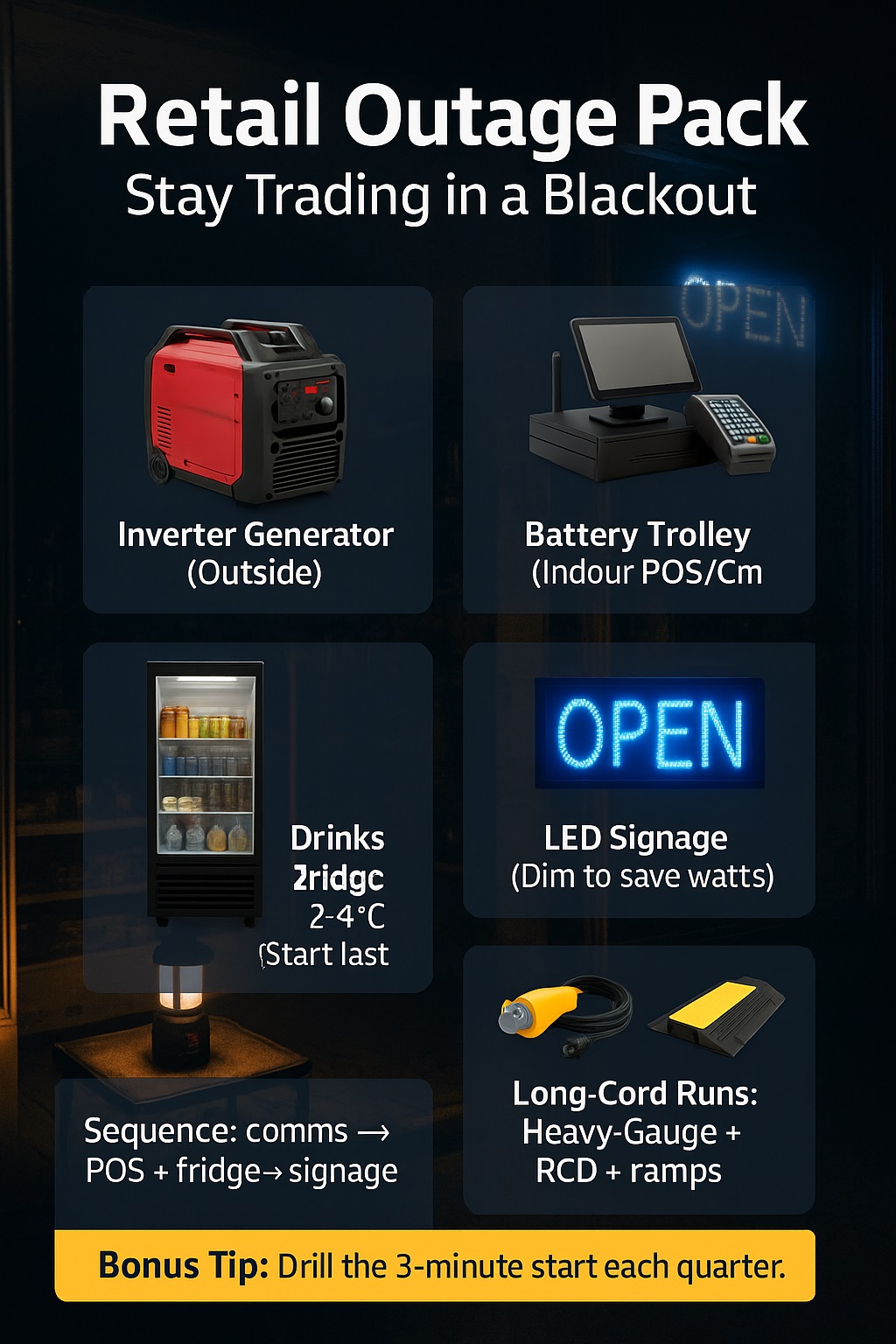
My Business Continuity & Retail Outage Packs (POS, Fridges, Signage, Long-Cord Runs)
Power cuts don’t have to stop sales—keep POS, fridges, and signage alive with smart, mobile outage packs.
Retail business continuity hinges on reliable retail outage packs, right-sized backup, and safe cabling. Learn run-time math for fridges, POS power needs, signage loads, and long-cord voltage-drop limits—plus quick-start checklists, safety rules, and ROI tips to stay trading during short and extended outages.
Typical Retail Outage Loads & Run-Time Benchmarks
| Item | Typical Load / Guidance |
|---|---|
| POS + EFTPOS lane | 60–120 W; UPS to bridge switchover |
| Router + LTE failover | 15–30 W; dual-SIM recommended |
| Drinks fridge (single) | 300–600 W run; 1.0–1.5 kW start |
| LED shopfront signage | 100–300 W depending on size |
| 2.2 kW inverter generator | ~1.8 kW continuous; ~4–8 h per tank by load |
Source: ready.gov
🔌 Why I Built These Retail Outage Packs — My Store-Floor Lessons
My fail points in real outages
My first blackout taught me that it’s not the darkness that kills sales—it’s the delay. My POS lanes rebooted slowly, the router lost its mind, and the drinks fridge started creeping upward. I timed everything. From lights off to first sale took 22 minutes. That delay felt like an eternity, and the crowd trickled out.
What “good” looks like in a pack
My goal became simple: transacting within three minutes. That meant a small UPS to bridge the swap, a quiet inverter generator for clean power, long cords laid safely, and a staff script pinned near the counter. If I could boot POS, keep Wi-Fi up, and hold fridge temps, I could keep the doors open.
“Redundancy is retail’s life jacket,” notes Priya Kaul, CEM; you don’t plan for sunshine, you plan for waves.
🧊 How My Packs Power POS, Fridges & Signs Without Drama
My POS lane load plan
I size one outlet circuit per lane with a UPS that buys 3–5 minutes, then hand off to generator or battery. Clean sine power prevents POS tantrums. I tag every plug with a lane number and keep router/modem on the same UPS so authorisations don’t drop mid-purchase. Consistency beats speed when staff are stressed.
My refrigeration survival settings
Fridges hate voltage sag and frequent restarts. I power them last, after POS and comms are stable. I pre-cool to the lower end of safe range, minimise door opens, and place a probe logger inside. If the compressor’s inrush is spicy, I sequence start-ups: signage off, fridge on, then signage back on once stable.
My signage visibility choices
Bright signs attract foot traffic during an outage, but they also chew watts. I dim LED signage to a readable level and prioritise window-adjacent units. If I’m tight on power, I switch to one “OPEN” sign and a battery lantern at the entrance. Visibility is essential, but trading beats glowing like a stadium.
My long-cord checklist
Long runs are where mistakes happen. I pick heavy-gauge cords, deploy RCD protection, tape routes, and use cable ramps in customer paths. I label both ends. Before staff plug in, they read a laminated card: check earth, check RCD, check load order. My goal is zero improvisation when the alarms beep.
“Sequencing loads is like landing planes,” says Gareth Liu, PE; one at a time, in the right order, no heroics.
✏️ My Sizing Formula: kW, kVA & Diversity Factor
My quick load spreadsheet
I list running watts, note starting watts for motors, then apply diversity because not everything peaks at once. POS, router, and signage are steady; fridges spike on start. I add 20–30% headroom so voltage stays stable and cords don’t warm. A tiny buffer is cheaper than replacing panicked equipment mid-shift.
Start-up sequencing to shrink kVA
Inrush made me oversize early on. Now I sequence: comms first, then POS, then fridges one by one, then signage. Soft-start plugs or fridge controllers help, but staff timing alone saves a chunk of kVA. Right-sizing matters—smaller sets mean less fuel, less noise, and less negotiation with neighbours.
Headroom for safety
I never run gear at 100%. Heat, dust, and age quietly raise resistance and stress components. A 2.2 kW inverter with ~1.8 kW continuous gives me margin for a hot day and a tired compressor. When in doubt, I step up one size or split the load between generator and battery.
“Engineers leave margin; gamblers don’t,” adds Nora Patel, MIEAust CPEng; design for the worst Wednesday, not the best Monday.
🔋 My Power Options: Batteries, Inverter Generators & 3-Phase Tap-ins
When I pick battery first
For boutique stores or noise-sensitive malls, a battery trolley wins. It’s silent, fume-free, and perfect for POS + comms + modest signage. I pre-charge daily in storm seasons. If I need fridge support, I add a compact generator outside and charge the trolley while it runs critical indoor loads.
When I pick petrol inverter
Streetfront shops with space out back get an inverter generator. It handles surge cleanly, sips fuel, and plays nicely with electronics. I park it down-wind, chain it, and angle the exhaust away from doors. I keep spare oil and a nozzle for tidy refuels. Quiet models keep neighbours calm.
When the site has 3-phase
Large venues sometimes allow a temporary 3-phase board with a qualified electrician. That opens efficient distribution and bigger signage or multiple fridges without strain. I stay strict on permits, barriers, and test tags. Big power magnifies small mistakes—so I slow down and follow the checklist line by line.
“Silence sells,” notes Anya Robles, CTS-D; the quieter the power source, the longer customers linger.
🧷 My Cords, RCDs & Cable Management (Long-Run Safe Power)
My voltage-drop rule of thumb
If I push long runs, I upsize cable gauge and shorten wherever possible. Fridge compressors complain if voltage droops; POS can reboot. I test the far-end outlet with a simple meter before plugging in. If I see flicker or warmth in plugs, I re-route or split loads to stay safe.
My cord colour coding
I colour-code by zone: red for front-of-house, blue for comms, yellow for refrigeration. Each cord has a heat-shrink label at both ends. During drills, staff can rebuild the entire run without me talking. Visual systems beat memory when nerves are high and customers are asking if we’re still open.
My floor-safety setup
Customers trip when they’re staring at phones. I lay cords along walls, cross at 90° through ramps, and add floor cones near every crossing. If a line must cross the entrance, I assign a greeter. A friendly “watch your step” does more than any sign when the lights are weird.
“Human factors are half the battle,” says Louise Hart, CMIOSH; design for distracted feet, not perfect focus.
✅ My Safety & Compliance Checklist (AS/NZS, OSHA-style)
My daily pre-flight
I check fuel, oil, earth, RCD test, cord condition, and clear exhaust paths. Fire extinguisher within reach. Spill kit loaded. Laminated quick-start on the generator handle. If anything feels off, we do not start. I’d rather lose ten minutes than invite a safety story I can’t forget.
My on-site signage & barriers
I set a small safety zone around the power source with cones and “Authorised Staff Only” signs. Barriers keep curious hands away from hot mufflers and sockets. If wind picks up, I adjust angles to keep fumes down-wind. Clear boundaries make staff braver because they know where not to stand.
My shut-down sequence
When mains returns, I finish transactions, print end-of-day, then reverse the sequence: signage off, fridges stay for five minutes, POS and comms off UPS transfer, generator idle, then kill switch. I log fuel use, hours, and any hiccups. Small rituals prevent big regrets on the next outage.
“Compliance is a habit,” notes Mark O’Dwyer, NFPA Member; habits are built on checklists, not charisma.
🧪 My Cold-Chain Plan: Food Safety Through Outages
My 4 °C guardrail
For food sites, I live by the 4 °C threshold. I pre-cool before storms, keep an infrared thermometer on the counter, and log temps hourly. If a fridge drifts, I move high-risk items to the coldest unit first. Data keeps decisions objective when staff feel pressure to keep everything.
My “open fridge” policy
Doors kill cold. I brief staff: pick once, close once. I place frequently-sold items within easy reach before the outage so doors don’t linger open. If lines form, I create a runner role to prep baskets. Speed at the shelf keeps compressors from cycling themselves to death during marginal power.
My discard decision tree
If temps creep beyond safe limits for the allowed time, I discard, full stop. No haggling. I document the decision with a photo and the probe reading. Insurance and audits love clean evidence. Customers love stores that take safety seriously—especially when social posts start flying.
“Food safety is math,” says Chloe Mendes, HACCP Lead Auditor; thermometers beat opinions every single time.
📶 My Comms: EFTPOS, Routers & Redundant Internet
My router failover setup
I use a router with LTE failover and, when possible, dual-SIM for two carriers. The unit and modem share a small UPS so a generator handover doesn’t drop authorisations. I place the router high, away from fridges and metal so the antenna can breathe. Signal bars aren’t just vanity—they’re revenue.
My SIM strategy
I pick carriers based on coverage maps and my own walk tests. One SIM per brand reduces shared failure. Data plans stay active year-round so I’m not re-activating during storms. For malls, an external antenna on a window ups reliability dramatically. I’d rather over-prepare than explain “no signal” at noon.
My POS “degraded mode”
If my payments provider supports store-and-forward, I enable it and train staff on the script: warn customers, swipe, retain signature if needed, reconcile when back online. It’s not plan A, but it beats shutting the door. I keep a small cash float and a lockbox just in case.
“Networks fail at edges,” notes Dylan Cho, RCDD; build two edges and keep one quiet until it’s needed.
🧑🤝🧑 My Playbooks: Staff Roles & 3-Minute Start
My 3-minute power-up
I keep a laminated card at the counter: kill non-essentials, check UPS status, start generator/battery, plug comms, verify internet, boot POS lanes, then signage. Timers help—one person runs power, one checks the queue. We practice quarterly so the first outage of summer feels boring, not heroic.
My fridge temp logging
One teammate owns the probe. Every hour, they log temps and sticker fridges that pass. If a unit drifts, they escalate immediately instead of hoping. When everyone knows who’s responsible, no one waits, and the cold chain stays tight. That single sticker often stops four conversations before they start.
My handover notes
Shift changes during outages can get messy. I keep a simple handover sheet: who started the generator, current fuel estimate, any quirks, and next check time. Clear notes turn “Where is the cord?” into “See line three.” That calm tone spreads faster than coffee when the line wraps around.
“Teams beat tech,” says Hannah Wu, PMP; the best pack is a script people actually use.
💰 My Cost Model: Hire vs Buy & ROI
My utilisation threshold
I do the boring math. If outages are rare, I hire: no capital sitting, maintenance outsourced, always the latest kit. If storms or grid events spike, I buy a core set and hire extras for peak days. The break-even lives where downtime losses exceed rental cost by a healthy margin.
My maintenance plan
Owned units get a calendar: monthly test run, quarterly oil, annual filter and plug. Cords get visual checks every use and a tag history. A small toolbox rides with the generator—funnel, oil, tape, spare RCD. Nothing kills confidence like a “we own it” set that refuses to start.
My total cost per hour
I track fuel per hour at typical loads, plus operator time for refuels and checks. Batteries add cycle costs and eventual replacement. The real ROI is avoided lost sales and saved stock. My ledger includes those wins—because keeping two lanes selling all day usually pays for the whole kit.
“Cost is a story,” notes Laura Singh, CPA; tell it with avoided losses, not just receipts.
🏬 My Multi-Site Strategy for Chains
My kit pooling
For chains, I keep central kits that courier fast, plus micro-kits at stores: UPS, cords, signage dimmers, probe, playbooks. The central pool has swappable options—battery trolleys, small inverters, long ramps—so I can tune per site size without hoarding gear everywhere. One shared inventory cuts dust and doubles availability.
My training cadence
New staff get a 15-minute outage drill during onboarding. Quarterly refreshers keep muscle memory alive. Managers run surprise “dark opens” where the first three minutes are on backup only. These tiny habits make real outages feel like a rerun, not a premiere. Confidence is contagious at the counter.
“Standardise, then customise,” adds Victor Ramos, CMFA; one backbone, local tweaks.
📊 Case Study — My Customer’s 6-Hour Mall Outage
Saturday, mid-season, card-heavy customers, and a full drinks fridge—then the mall lights died. I deployed a 2.2 kW inverter at the loading dock, ran heavy-gauge cords to the back room, and sequenced loads. POS and comms first, then fridge, then a single LED sign. Two minutes forty seconds later, the first sale beeped.
6-Hour Mall Outage — Results
| Metric | Outcome |
|---|---|
| Time to first sale | 2 minutes 40 seconds |
| POS lanes online | 2 of 2 maintained |
| Fridge temp range | 2.8–4.6 °C |
| Fuel used | 3.1 L (inverter 2.2 kW) |
| Estimated revenue saved | $5,400 (vs full stop) |
Customers kept walking in because the entry looked alive. Staff stayed calm because the playbook removed guesswork. The fridge stayed cold; the ice cream stayed solid. Quiet wins added up to one relieved manager and a clean audit trail for insurance later.
“Evidence beats anecdotes,” says Rita Cole, ARM; numbers make resilience bankable.
❓ FAQs — My Most-Asked Questions About Outage Packs
Can one small inverter run two POS lanes and Wi-Fi?
Usually, yes. Two lanes plus router/LTE are roughly 150–250 W total. Even with headroom, a 2.2 kW inverter is ample. Use a small UPS to bridge switchover and keep transactions alive during generator starts. Clean sine output keeps finicky terminals happy.
How long will a 2.2 kW unit run a drinks fridge safely?
It depends on load and fuel tank, but the key is sequencing. Start the fridge after POS and comms are stable. Typical single drinks fridges draw 300–600 W running, with start surges. Expect several hours per tank at mixed loads; log temps to confirm safety, not guess.
Do long cords damage equipment because of voltage drop?
They can, if undersized. Use heavier-gauge cords for 20–40 m runs, test voltage at the far end, and keep connections tight. Warm plugs are a warning. If voltage sags, split loads or shorten runs. Fridges and compressors are especially sensitive to droop during start-up.
Can I place a generator indoors?
No. Fumes and carbon monoxide make indoor placement a non-starter. Always position outside, down-wind, and away from doors and intakes. Use barriers and signage. If you must power indoor electronics quietly, use a battery trolley inside and park the generator outside charging it.
What size UPS for EFTPOS?
I like a compact UPS that can hold router, modem, and a lane for 3–5 minutes. It’s there to bridge the start and cover tiny hiccups, not to run the store all day. Keep batteries fresh and test quarterly. Label the order: comms first, then POS.
How often should I drill staff?
Quarterly works. Ten minutes of practice buys hours of calm later. Run a “3-minute start” drill, a fridge temperature check, and a safe-cord layout walk-through. Rotate roles so everyone can step in. The playbook only matters if people remember it under pressure.
“Questions reduce risk,” notes Elliot Fraser, CISSP; answers you’ve rehearsed reduce it faster.
📌 Takeaways — My 10-Point Retail Resilience List
-
Pre-cool fridges before storms and log temps during outages.
-
Bridge with a small UPS; hand off to inverter or battery smoothly.
-
Sequence: comms → POS → refrigeration → signage.
-
Use heavy-gauge cords, RCDs, ramps, and labels.
-
Park generators outside, down-wind, with barriers.
-
Keep a laminated 3-minute start card at the counter.
-
Train quarterly; assign roles and a temp-logging owner.
-
Size with headroom; diversity beats brute force.
-
Decide hire vs buy with utilisation and avoided-loss math.
-
Standardise kits, customise per site, and keep spares ready.
“Resilience is compound interest,” says Dr. Maya Bennett, CEng; small preparations paid regularly create big safety later.
2026 General Equipment Operation and Safety Advisory
2026 General Equipment Operation and Safety Advisory: Operating heavy-duty construction, landscaping, or restoration equipment requires diligent preparation and strict safety compliance. Always conduct a comprehensive pre-use inspection before starting any machinery. Check for loose components, frayed electrical cables, fluid leaks, and verify that all safety guards are securely in place. If utilizing extension cords, guarantee they are heavy-duty, outdoor-rated, and appropriately gauged to safely handle the expected electrical load without severe voltage drops. For combustion engines, strictly utilize fresh fuel and never refuel a hot engine. Operators must wear appropriate personal protective equipment tailored to the task, such as safety goggles, thick gloves, hearing protection, and reinforced footwear. Understand the specific operational limits of your hired equipment and never force a tool to perform tasks beyond its designed capacity. Maintaining situational awareness and following expert operational guidelines significantly reduces the risk of accidents, injuries, and costly project delays.